Every map needs three approvals
Every year, an investment firm must prove to its auditors who owns each company it backs. The proof is an ownership map, every stake to two decimals, and each one needs three approvals before a lawyer attests it.
The brief: about 100 maps a year, in batches, the first with a fixed date. I led the design for a month with the product team and engineers, reviewing every step with the lawyer. Wren & Hale stands in for the real firm, and names and example figures are invented.
A single map took six tools and 95 minutes
Before designing anything, I sent the lawyer written questions, studied the real files (the tracker, seven email templates, a registry extract, a calculation sheet) and followed one map from list to signature. It crossed six tools by hand and took about 95 minutes. Only four of its ten steps needed a lawyer.

The day started in a spreadsheet
- The step: Nadia found the map’s row in the tracker: its due date, and which reviewers had answered.
- The catch: One colour per status and a notes column for the chase log, every cell typed by hand.
Which file is the latest?
- The step: The owner document came down from the firm’s database, one download per map.
- The catch: Old copies sat next to the current one with almost the same name, and the wrong one looked just as right.


Quick and nearly right
- The step: The document went into ChatGPT to list the owners and their stakes.
- The catch: It could skip an owner on a later page, so no answer was trusted as it came.
The highlighter pass
- The step: Each answer was checked line by line against the PDF, every number highlighted.
- The catch: The slowest part of the map, and one of the few steps that needed a lawyer.


Drawn box by box
- The step: The map was redrawn in PowerPoint, every box placed and every stake typed in.
- The catch: One correction meant moving the lines and checking every number on the slide again.
Three reviewers to chase
- The step: The map went out from Outlook in a separate email to each of the three reviewers.
- The catch: Every reply was split out by map and logged back in the tracker by hand.

This is one map on a good day: the file is current, every reviewer answers the first email, and nothing needs a correction.
A usual year is about 100 maps, and few of them go like that. Each one waits on three reviewers, so the year runs on hundreds of emails, chasers and replies, every one logged by hand. Reviewers leave emails unanswered, a chaser gets forgotten, a contact has left the firm, and a single correction sends a map back to all three.
Each dot is five touches by hand. The 3,100 add up to a full year of 100 maps, and some 300 of them, in red, only repair something that went wrong. An estimate, built from the files the research studied.
The method this case follows
A faster process the lawyer couldn’t check would never be used, so the project needed a method that proves each step before moving on. I chose the Design Science Research Methodology (Peffers and colleagues, 2007), made for building systems that have to work in real life. This case follows its six activities in order.
- Problem: written questions, the real files and one map followed through six tools
- Objectives: four measures agreed with the lawyer
- Design: the workflow, drawn while engineers built the engine on real files
- Demonstration: one real file, run from upload to signature
- Evaluation: five rounds with the lawyer, one of which turned a row of buttons into an agent
- Communication: this case
What the research told me to build
Before drawing a single screen, I needed to know what the platform should do and what it must never do. I went back over the lawyer’s written answers, the real files and the one map I had followed, and four findings kept coming up. Each one became a design decision.
Checking the numbers and the map, approving the emails, signing
And it has no way to skip the lawyer’s four
A reminder on day 4 and on day 8, and silence never counts as approval
Anyone on the team can read and change them
To see where a map stood, she filtered rows
Its stage, its reviewers and its next reminder
Every number was checked again by hand
One click shows where in the file it came from
Nadia signs, Leo chases, Kenneth waits
Three people touch every map. Nadia, the lawyer, checks it and signs it. Leo, her associate, sends the emails and keeps the reminders going. Kenneth, at the client, waits for the signed map and keeps asking how far along it is. Each of them changed a part of the platform.

Signs every map herself, and used to spend each batch moving numbers between PDFs, ChatGPT and Excel.

Runs the requests, follow-ups and replies, and worries about sending the wrong thing in Nadia’s name.

Answers to the auditors for every map, and used to ask the firm every Monday where things stood.
Nadia runs the yearly attestation for the firm’s largest investment client, and she is the only one allowed to sign. Before the platform, one map meant downloading the owner document from the database, pasting it into ChatGPT, checking every answer against the PDF, redoing the maths in Excel, redrawing the map and writing three emails.
Each morning starts with the same questions: what is waiting for her review, what is at risk this batch, which changes still need to go in. In the old spreadsheet each one cost twenty minutes of filtering. Now they are views on her board, and her day is the four approvals the agent stops for.
- Sign only what she has checked herself
- See the whole batch’s risk in one look each morning
- Trace every figure back to its page in the document
- Hand the chasing to something she can trust
- Keeps the board on one screen and the document on the other
- Opens the at-risk view before her inbox
- Checks each figure against the source before approving
- Writes a short reason whenever she overrides a state
- Copying the same numbers between four tools
- AI answers she couldn’t sign without checking again
- Replies that cover a dozen maps at once
- No warning before a map slipped
The four gates and the morning views. The board opens on To review and At risk, every figure links to its page, and she approves, attests or sends back. Nothing she hasn’t approved leaves in her name.
Leo joined to take the emails off Nadia’s desk: send the requests, keep the follow-ups going, sort the replies and fix the contacts. The old way meant an Outlook folder per batch, a notes column in Excel and a lot of “did we send this?”
He is quick and careful, but he doesn’t know the history behind each map or each reviewer. Two things worry him: sending the wrong thing in Nadia’s name, and missing the one reply that asked for a change.
- Start each day knowing exactly what is waiting for him
- Send only what has been approved, to the right person
- Pass anything legal to Nadia with the context attached
- Get every contact right the first time
- Works the Mailroom from the top, Needs you first
- Checks the Activity log before chasing anyone by hand
- Fixes a bounced contact the same day
- Leaves notes on the map for Nadia
- Replies that answer for several maps at once
- Contacts missing or out of date
- No record of who sent what, and when
- Not knowing whether a reply needs a lawyer
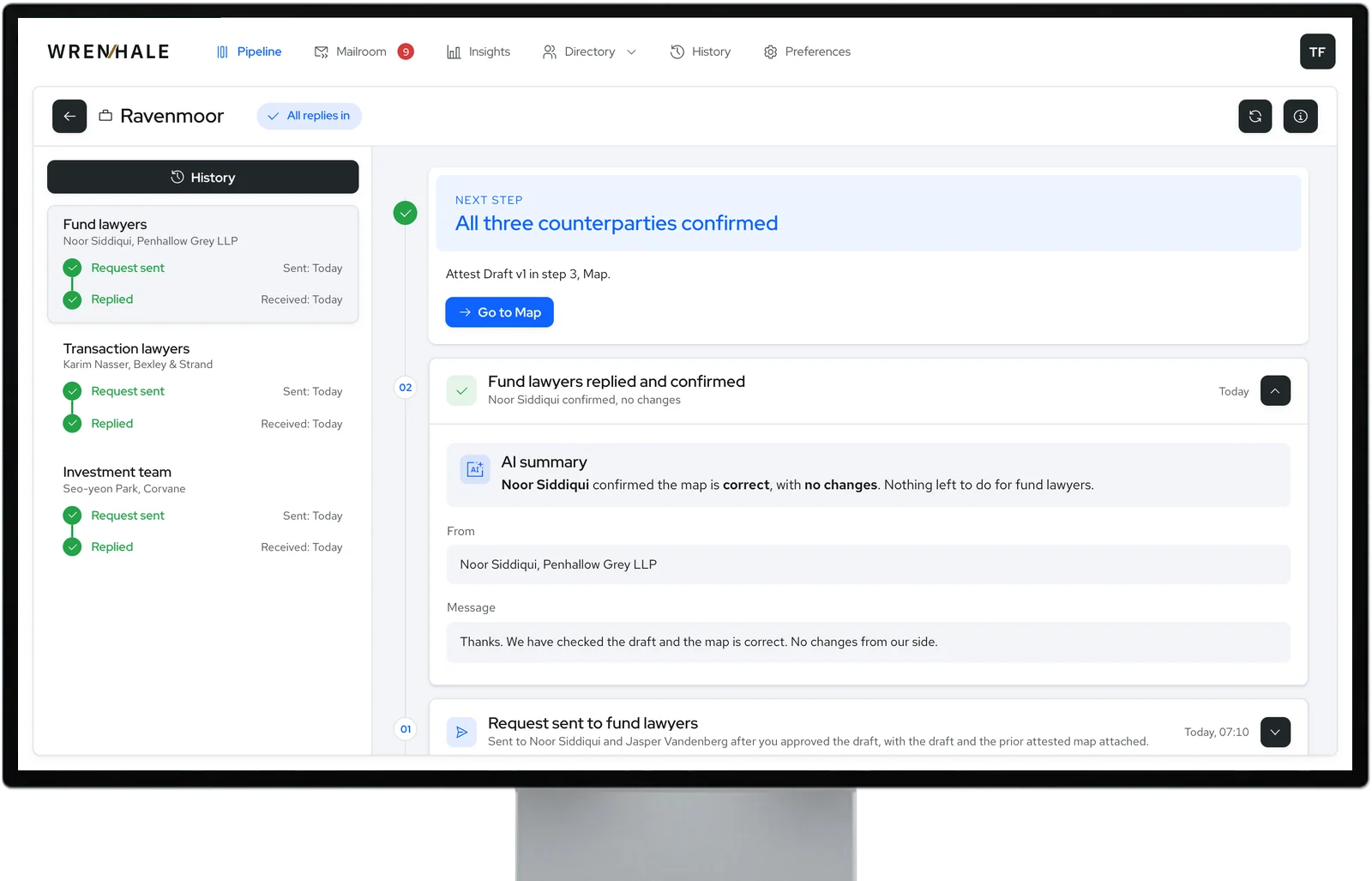
The Mailroom. Every reply arrives matched to its map with a short summary, the unclear ones marked Needs you, and Activity shows what the agent already sent and why. Leo approves and sends, and the signature stays with Nadia.
Kenneth answers to the auditors for every map. He doesn’t need to see how the work gets done, only that it is on track and that nothing will land late. Until now that meant an email to the firm every Monday and a status spreadsheet that arrived days later, already out of date.
He reads between meetings, mostly on his phone, and forwards one line upstairs: how many maps are attested and how many are at risk. A status a day old is fine. A status he has to ask for is not.
- See progress by batch without having to ask
- Spot a late map early enough to act on it
- Report upwards with one clear number
- Download a signed map the moment it is ready
- Asks the firm for a status every Monday morning
- Forwards summaries without opening the attachments
- Calls only when a deadline is in danger
- Keeps his own list of what the auditors asked
- The status lives in someone else’s spreadsheet
- Updates arrive after the auditors’ questions
- No single figure to report upwards
- Signed maps scattered across emails and folders
A read-only view for the client with progress by batch and by stage, each map’s due date and its signed file, plus a report that emails itself every Monday. Internal notes and the agent’s reasoning stay out of it.
One platform in place of six tools
The platform I designed takes over the routine from section 2. An agent reads each owner document, works out the numbers, draws the map, writes the emails and chases the replies. Nadia steps in only for the four calls that need a lawyer, and by then the draft is already done.
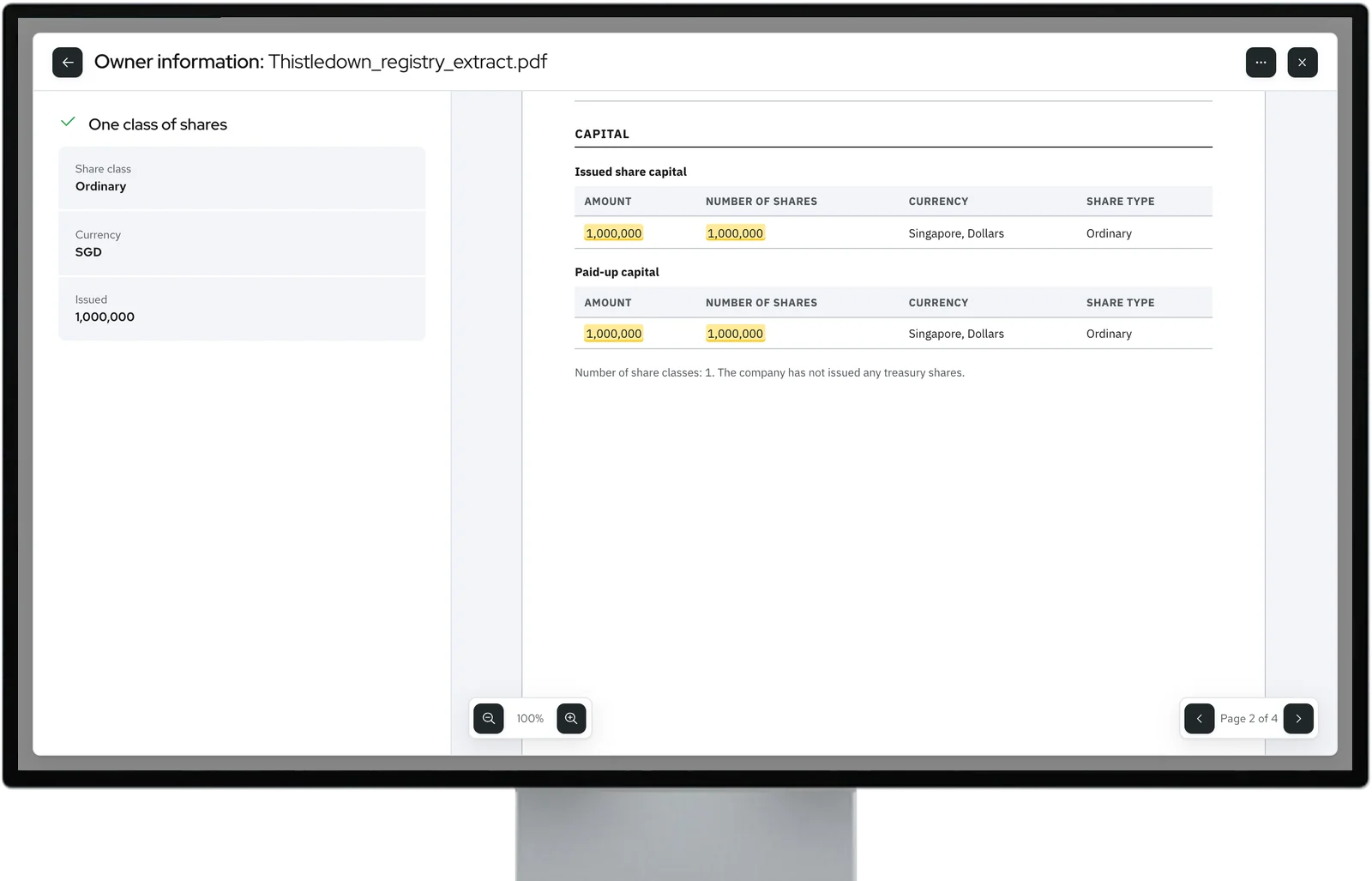
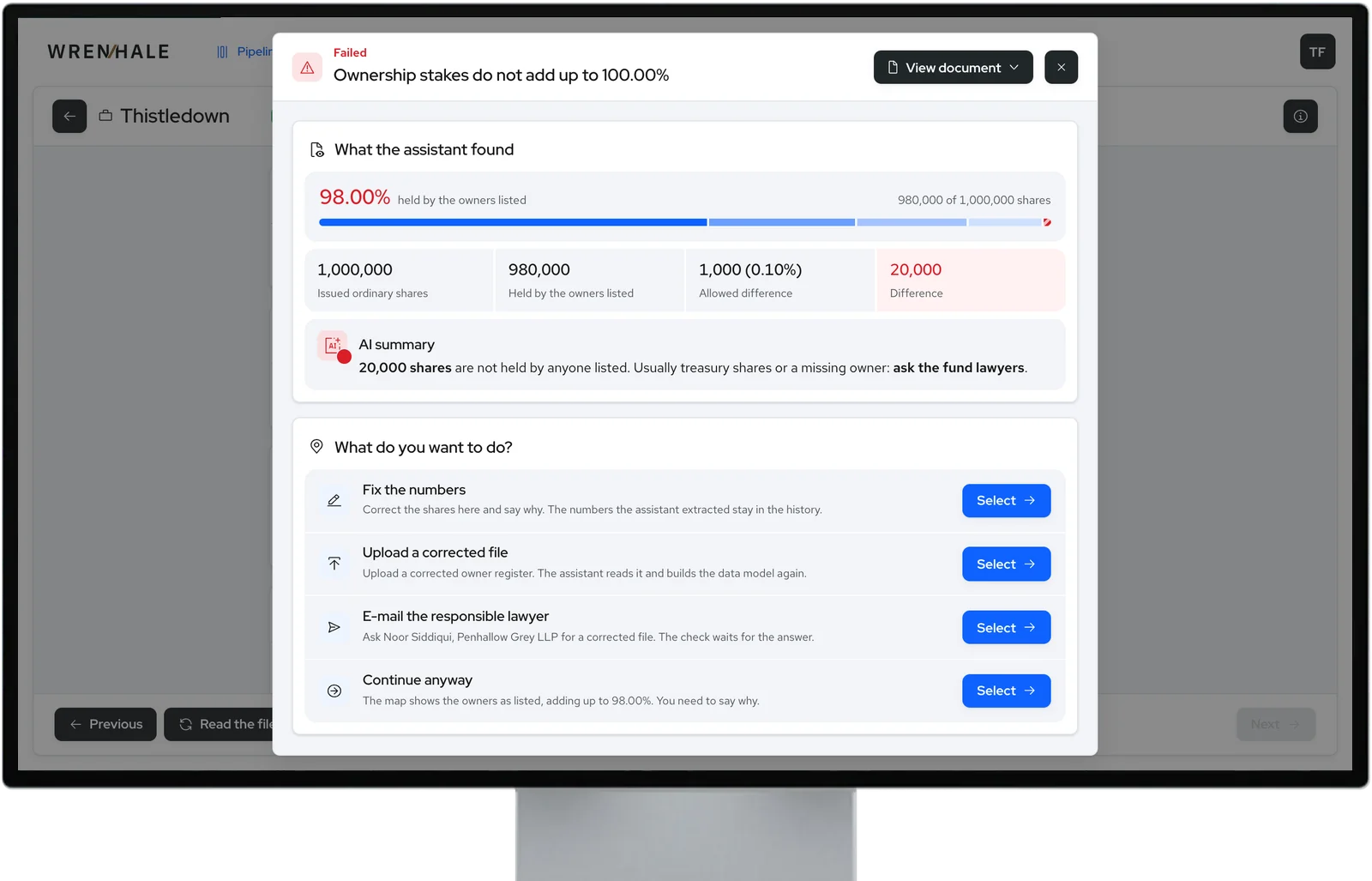
It finds every owner and stake in the document, adds them up and links each number to the page it came from.
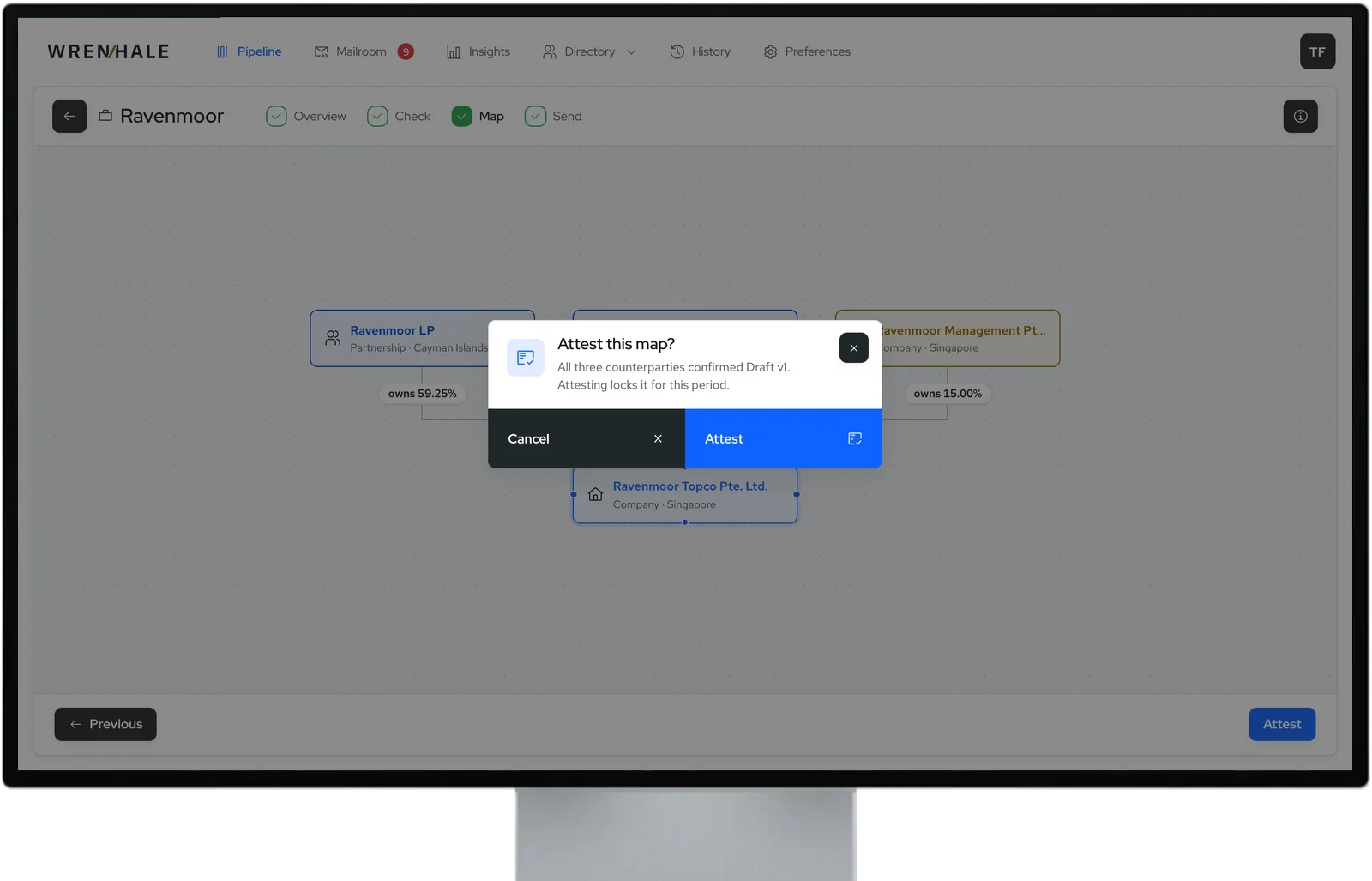
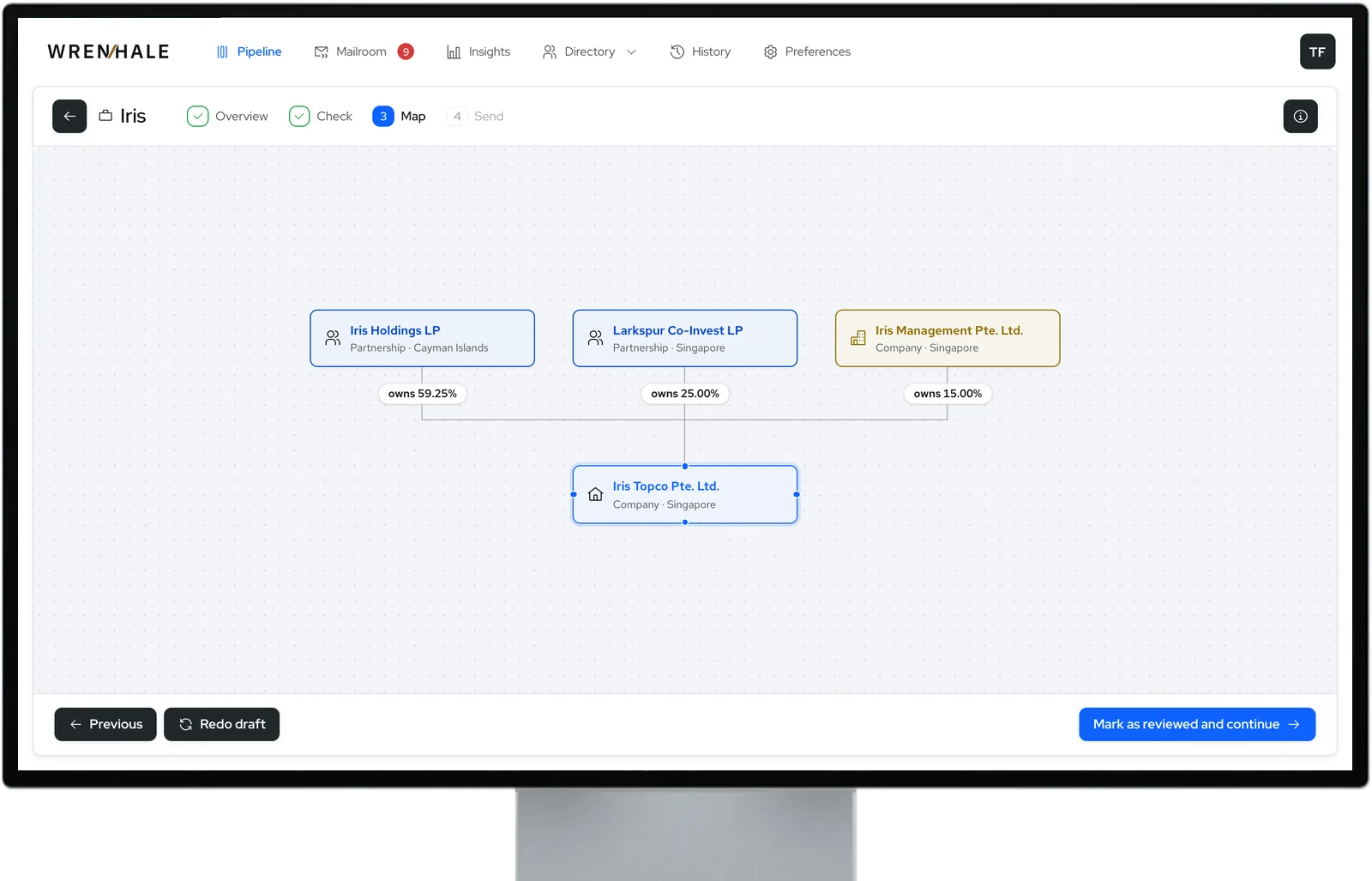
Once Nadia approves the numbers, the map is drawn from them, so nobody types a stake twice.
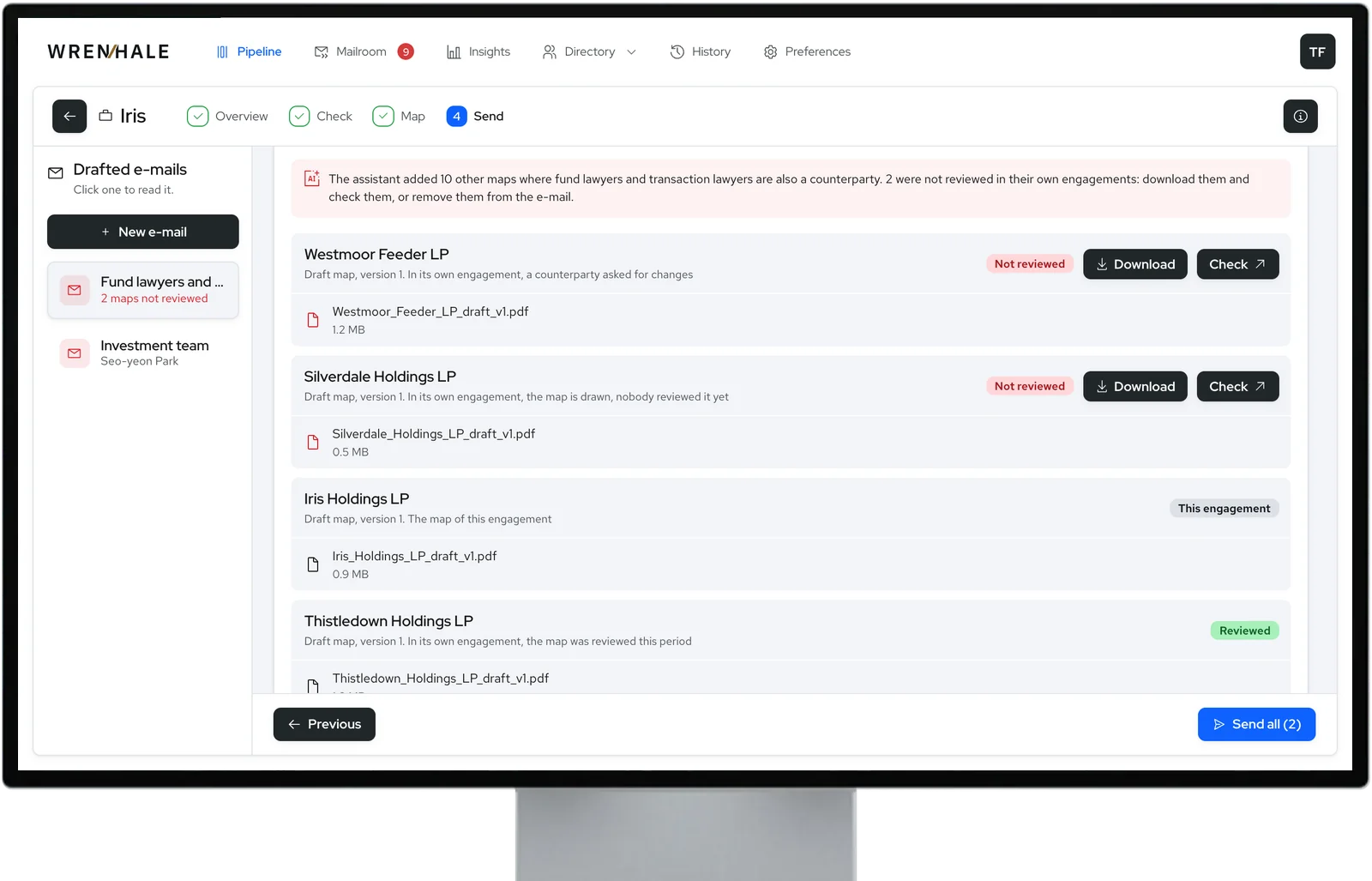
One email per reviewer with all their maps, reminders on day 4 and day 8, and every reply filed under its map.
The numbers, the map, the emails and the signature wait for Nadia. The agent has no way past them.
Who does which step now
The ten steps stayed the same. Before, Nadia did every one of them by hand. Now the agent runs six of them and hands her the four that need a lawyer, in one straight line.
What Nadia opens each morning
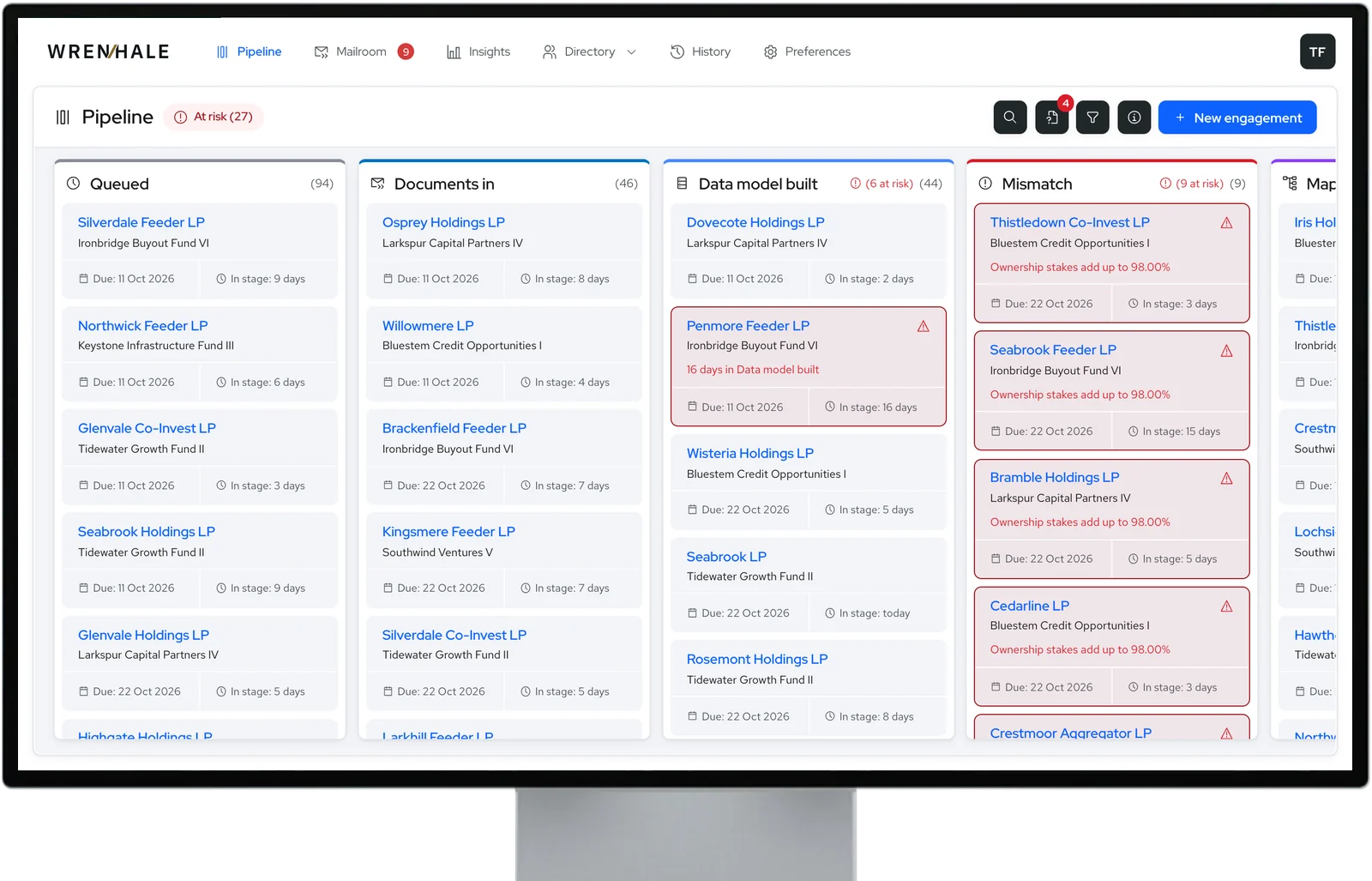
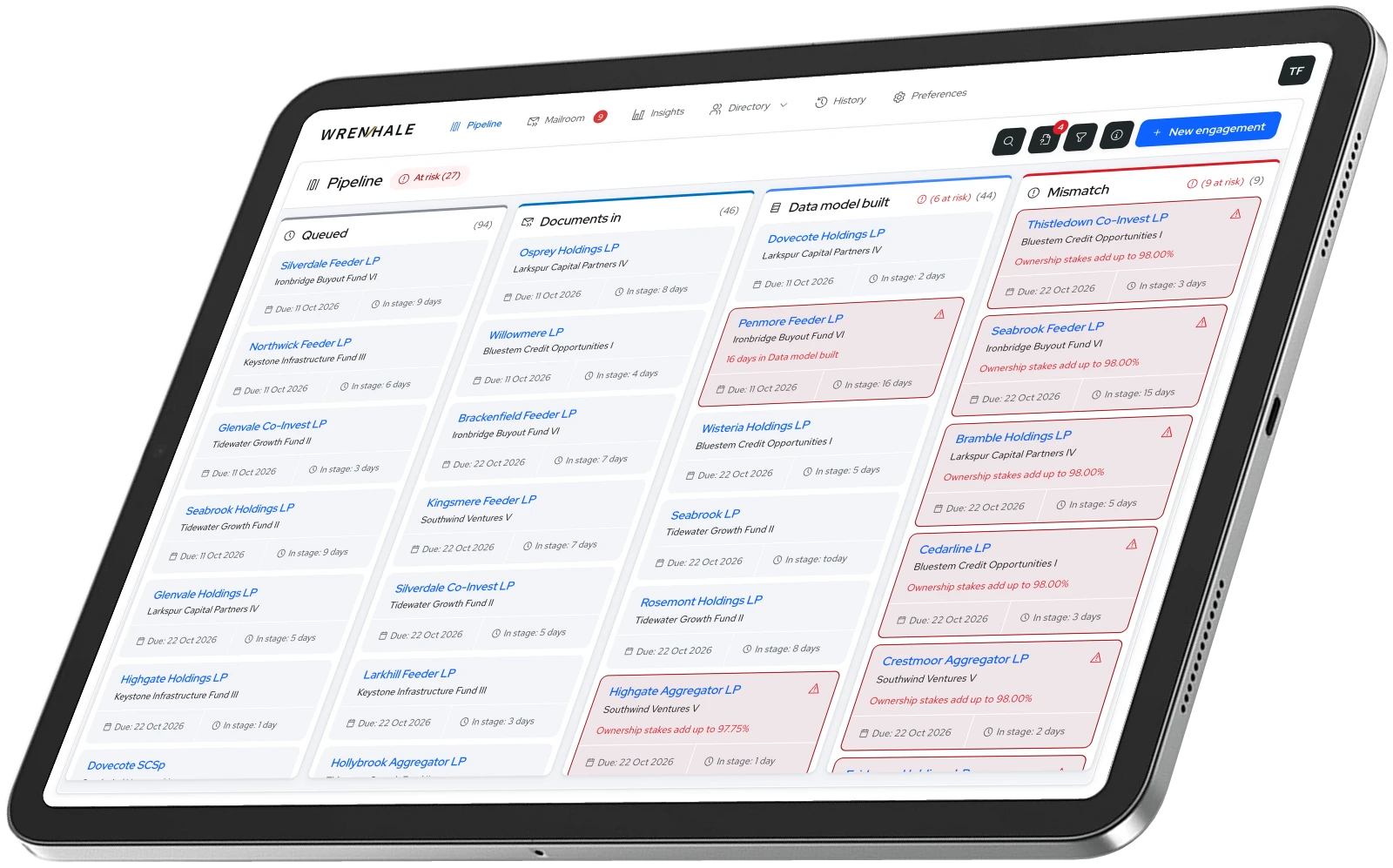
Every morning used to start in the tracking spreadsheet. The Pipeline replaced it, and every part of the board answers a question she used to ask of those rows.

A spreadsheet for everything
- A hundred rows, one colour per status, every cell typed by hand.
- The next follow-up lived in a notes column, when someone wrote it down.
- Which version a reviewer had confirmed meant digging through the email thread.
- A total that didn’t add up showed only if someone did the maths.
- Six tools stayed open all day, and the spreadsheet was the only memory.
The Pipeline
- One card per map, in the column of its stage, from Queued to Delivered.
- A flagged card says why: stakes that don’t add up, or too long in one stage.
- One chip per reviewer, so a stalled reply shows.
- “At risk” means the due date minus the steps left.
- Queues for approvals, triage, discrepancies and missing contacts.
What keeps the lawyer in charge
Speed was the brief. These four choices are why Nadia trusts what the agent hands her.
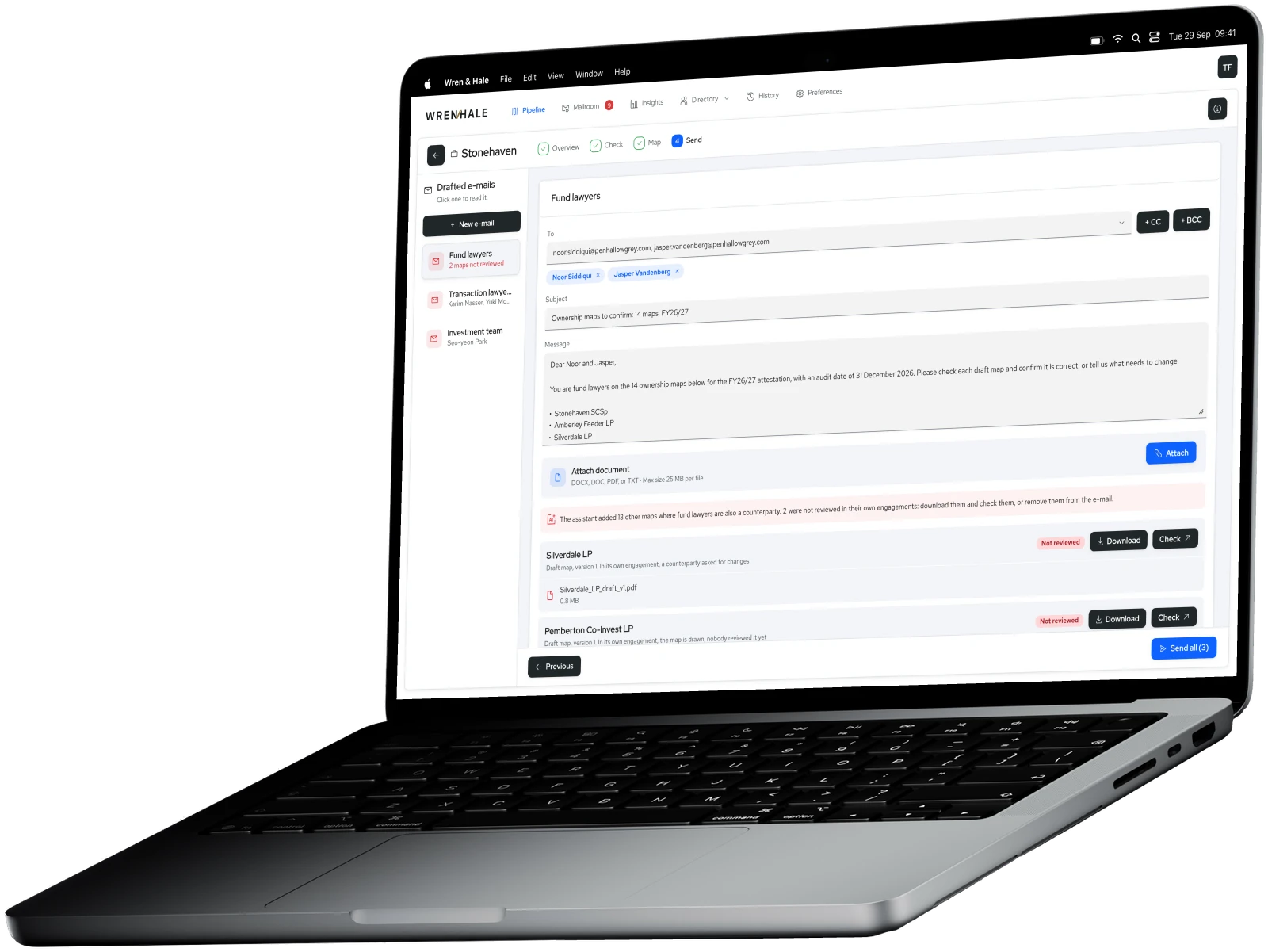
The numbers, the map, the emails and the signature wait for Nadia. The agent has no tool to skip her.
Silent reviewers are reminded on a set schedule, never on a weekend. No reminder needs a lawyer.
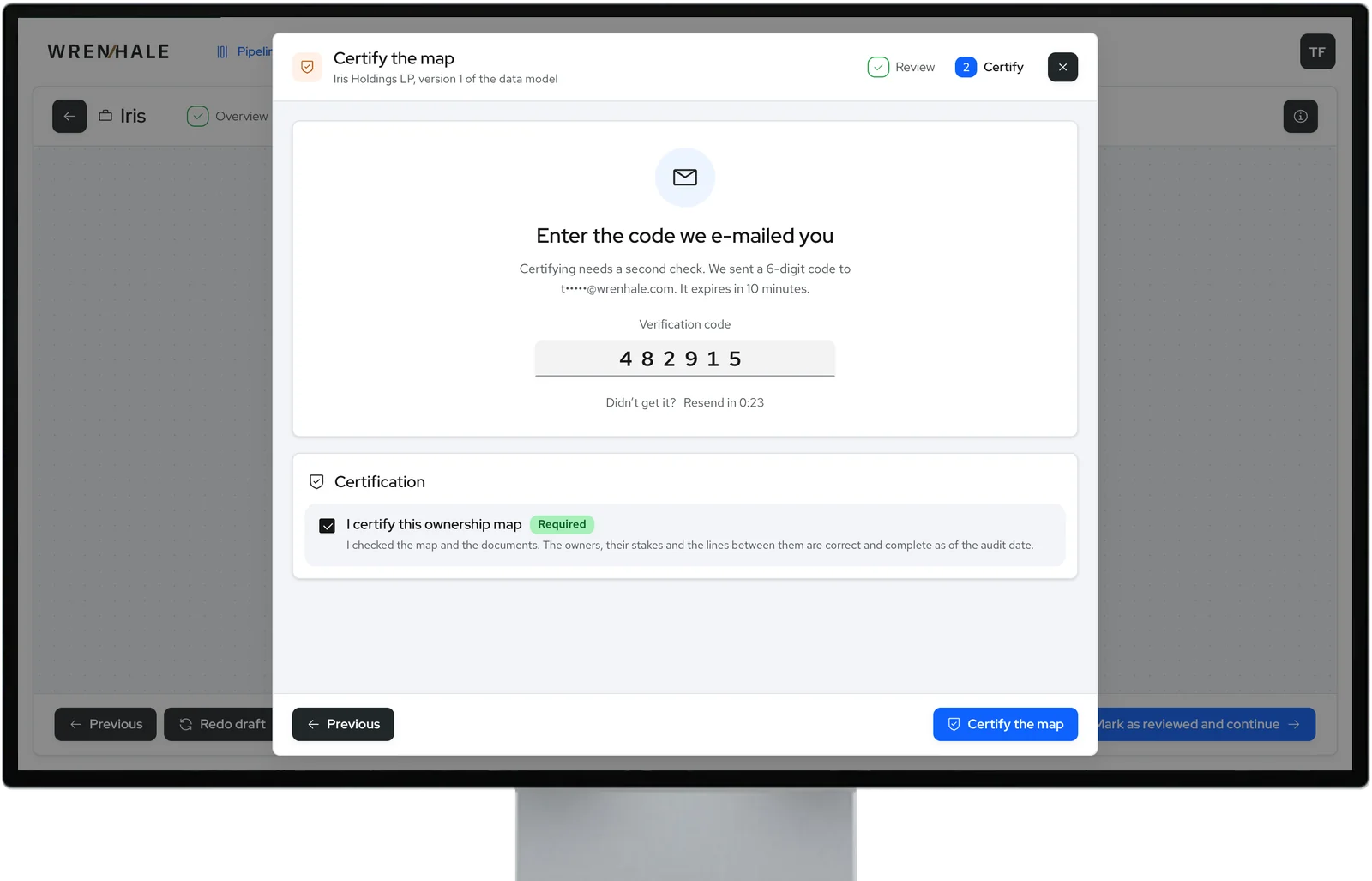
Certifying is a legal act, so a code sent to Nadia’s inbox proves it was her.
Silence never counts as approval. Only Nadia applies a requested change.
Back to the six problems
Each problem from section 2, and the part of the platform that answers it.
One row per map, and a notes column as the only memory.
One card per map, flagged with the reason, and the list of maps imported by itself.
6 in 10 maps were missing a contact.
Contacts read once from the files, missing ones listed first, bounced emails flagged.

Every answer was checked again against the PDF.
The agent reads the file and highlights each number where it found it.
A single reply could cover fourteen maps, split by hand.
When one reply confirms ten maps and questions four, the agent files each part under its own map.
Day 4, day 8 and day 12, worked out by hand.
Reminders on day 4 and day 8 list only the maps still open. On day 12 it hands over to Nadia.

One correction sent a map back to all three reviewers.
A change makes a new version, all three see it, and only approvals of the latest one count.
The lawyer tried it on a real file
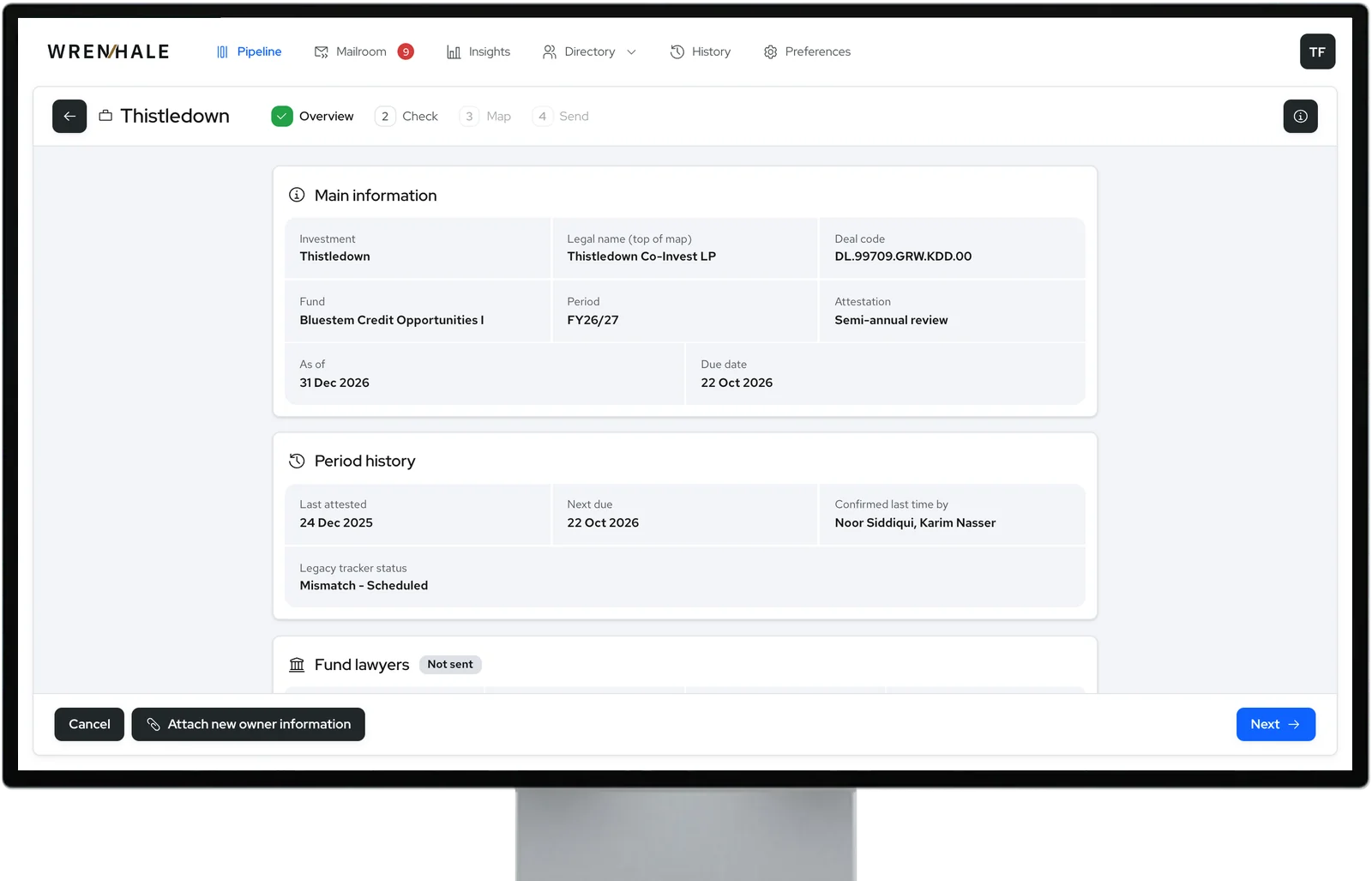
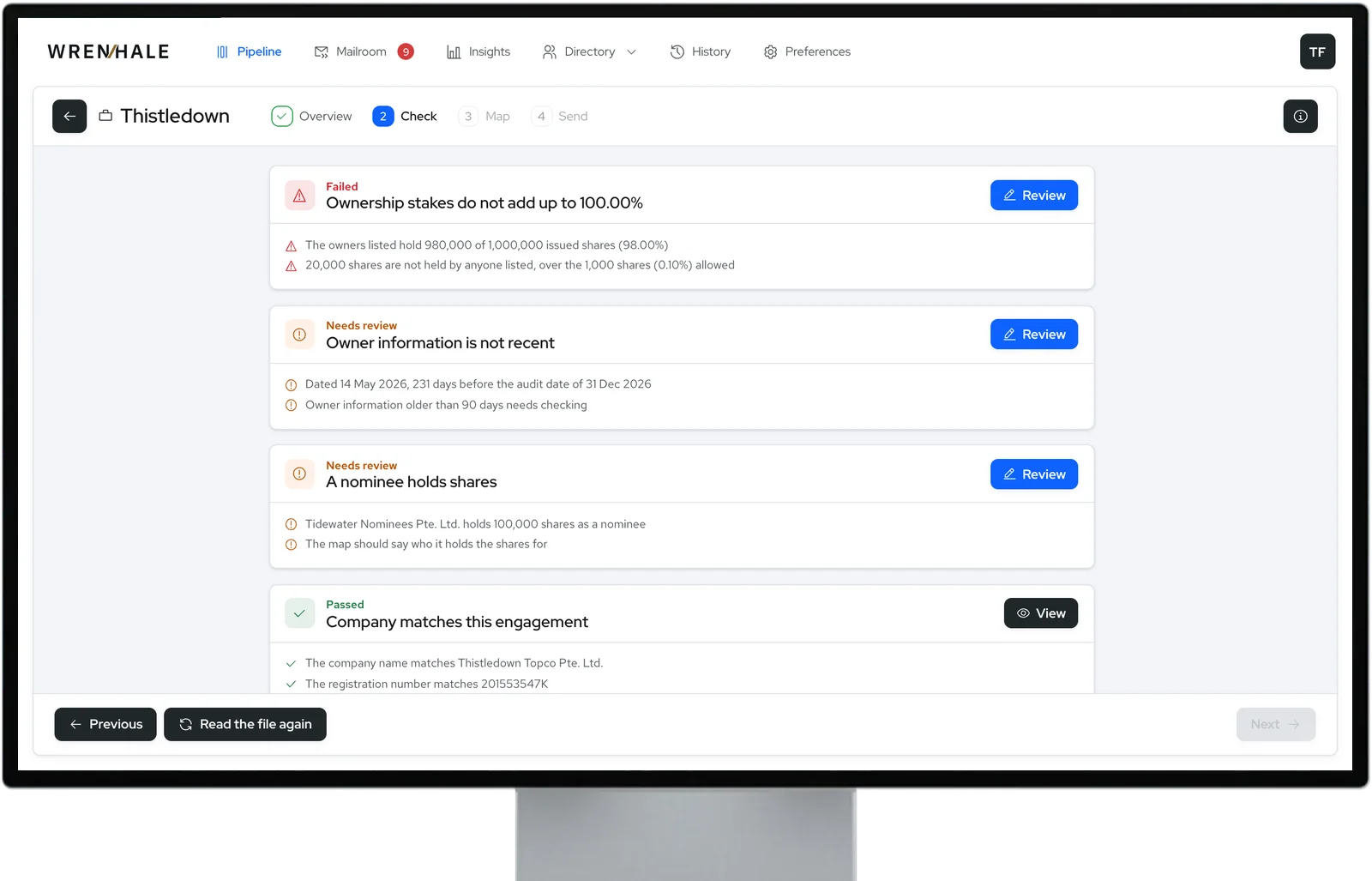
Before any of it was built for real, the prototype had to convince the person who would sign with it. I sat with the lawyer, uploaded a real registry extract with no map selected, and let the platform take it from there. It found the map, caught a total of 98%, drew the map and drafted the emails, the work that used to fill most of her 95 minutes.
Here is the whole journey, from the batch to the signature, as it runs in the prototype. You can follow it yourself with the same file.
What changed for the lawyer
The first number was measured across the five review rounds with the lawyer. The others are my estimates for a batch of 40 maps, compared with the last batch done by hand. Over a usual year of about 100 maps, going from about 95 minutes of hands-on work a map to about 8 projects to around 145 hours saved a year.
What I’d do again
Writing this case is the method’s last activity. Two habits from this project are coming with me to the next one.

I decided where the agent must wait before deciding what it does. The stops are why the lawyer trusted the rest.

Every action carries a why and every reply a summary. An agent the lawyer can check is one the lawyer will use.